

We’re excited to welcome you to the Women in Tech Global Conference 2026 (May 12-15, Virtual), a global, virtual experience bringing together thousands of leaders, builders, and innovators across technology, AI, and beyond.
This is your space to learn, connect, and explore what’s next, at your own pace, from anywhere in the world.
If you're wondering how to make the most of it, this guide will walk you through everything you need to know — from getting started to planning your schedule and connecting with others.
How to Register
To join the event, visit:
👉 https://events.ringcentral.com/events/women-in-tech-global-conference-2026
Click “Register” and complete your details.
If you’ve already purchased a ticket, simply follow the instructions in your confirmation email.
After registering, you’ll receive an email inviting you to complete your profile. This helps others get to know you and makes networking easier.

How to Log In
Log in using the email you registered with for the conference.
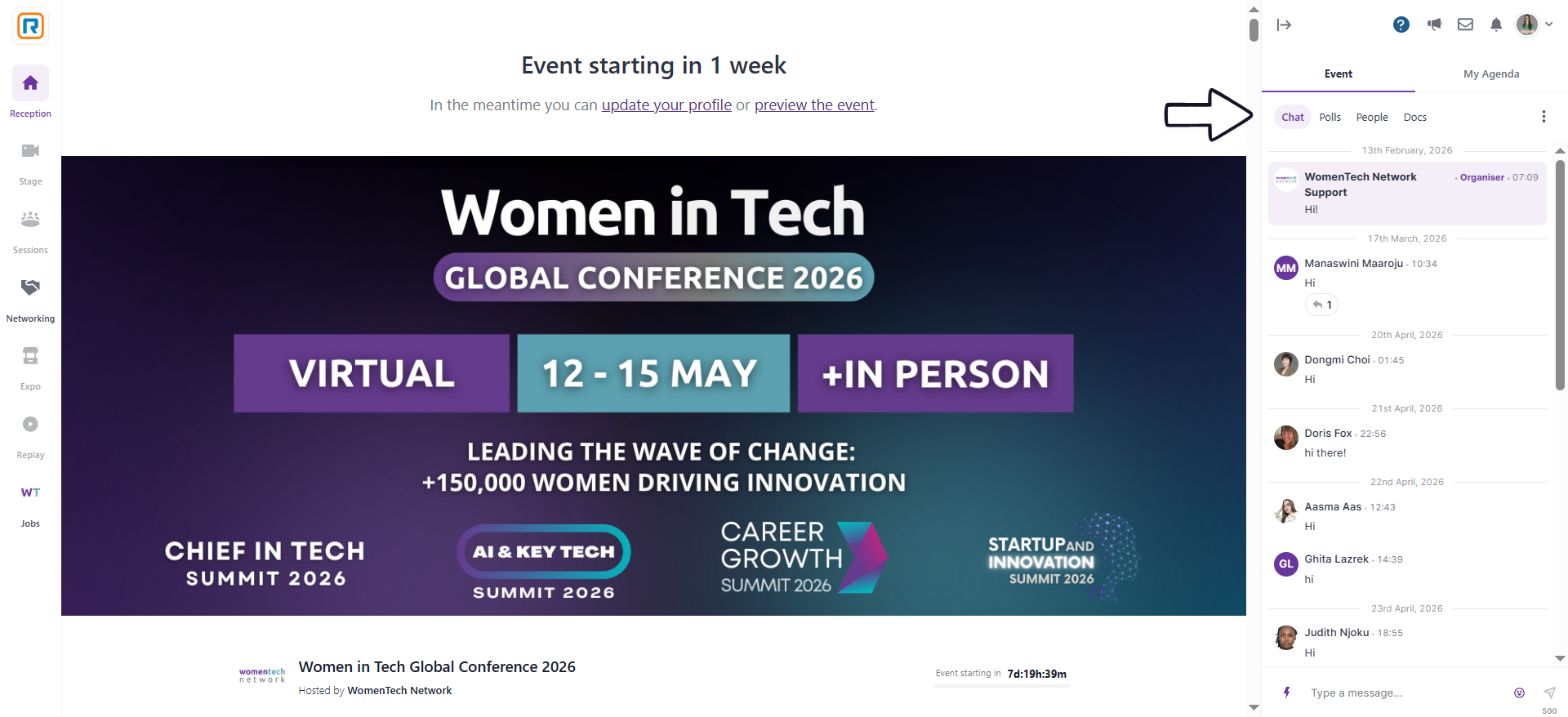
You’ll be directed to the Reception Area, your main entry point to the event.
Here’s what you’ll see:
Event countdown at the top
Event chat on the right
Main navigation menu on the left

Event Schedule (See Reception)
The Women in Tech Global Conference is organized across four themed summit days:
May 12 — Chief in Tech Summit: Connect with senior leaders and executives shaping the future of tech
May 13 — AI & Key Tech Summit: Explore AI, emerging technologies, and innovation
May 14 — Career Growth Summit: Focus on career development, leadership, and future skills
May 15 — Startup & Innovation Summit: Hear from founders, investors, and builders driving change
Plan your schedule ahead: With 600+ sessions across four days, it helps to take a few minutes to explore the agenda and add the sessions you’d like to attend.
👉 Visit the Schedule tab to browse sessions, speakers, and timings. All sessions appear in your local time zone.
How to Add Sessions to Your Calendar on RingCentral
Under the Schedule tab, you can add sessions to your personal agenda by selecting the calendar icon next to each one. This helps you keep track of the sessions you’re interested in and join them on time.
We also recommend enabling notifications and checking your email for daily updates during the conference.
Please note that schedules may occasionally change due to unforeseen circumstances.

Stage & Session Areas
The conference experience is organized across two main areas: Stage and Sessions, each offering a different way to explore the program.
The Stage is where you’ll find the main sessions, including keynotes and featured conversations that bring the entire community together. These are moments to hear from leading voices across technology, AI, and leadership, and to stay connected to the broader themes of the conference.
The Sessions area offers a wider range of talks, panels, and discussions across topics and formats. This is where you can dive deeper into specific areas of interest, explore new perspectives, and shape your own experience based on what matters most to you.
You’re free to move between sessions throughout the day, so you can follow your schedule or adjust it as you go. Sessions will become available 5 minutes before they begin, allowing you to join on time and stay up to date.
Connect with the Community
Introduce Yourself & Ask Questions (Event Chat)
The event chat is one of the easiest ways to feel part of the conference from the moment you join.
You’ll find it on the right-hand side of the platform, where conversations are happening throughout the event. Many attendees start by introducing themselves — sharing where they’re joining from, what they’re working on, or which sessions they’re most interested in.
It’s also where you can ask questions during sessions, react in real time, and engage with speakers and other participants. Even a simple message can spark a conversation or lead to a meaningful connection.
If you’re not sure where to start, a short introduction or a comment on a session is always a good first step.
Explore the Expo Area
The Expo Area is where you can connect with the organizations supporting the conference and learn more about the work they’re doing across technology, AI, and beyond.
You’ll find teams from companies such as EY, Schneider Electric, Deloitte, RINA, 5280 PMO, Sephora, and Anaplan, each offering a closer look at how they approach innovation, transformation, and building in their respective fields.
As you explore, you can learn about their projects, discover how their teams work, and see where your interests might align. Many partners also host meet & greet sessions, creating a more relaxed space to ask questions, hear directly from their teams, and start conversations.
Whether you’re curious about career paths, collaborations, or simply want to understand how different organizations are shaping the future of tech, the Expo Area offers a space to explore at your own pace.

Meet & Greet Sessions
A meet-and-greet is a 30-minute session designed for networking between job candidates, employees, and industry professionals. It often includes discussions with experts, insights sharing, audience Q&As, and potential hiring opportunities. These gatherings facilitate genuine conversations, making them beneficial during the hiring process and for fostering connections among professionals.
Networking
Go to the Networking area under Sessions.
Click “Ready” to be matched with another attendee.
Enjoy a short video chat (with a countdown timer).
Once the timer ends, the system returns you to the Networking area.
Pro Tips for Networking
Have a 30-second personal intro ready.
Use the chat to follow up with new contacts.
Be open to spontaneous video chats—they’re often the most fun!
Use the official hashtag #WTGC2026 to share on social
Share posts about your learnings, favorite talks, and highlights on social media or blog.
We prepared these templates for you to share on LinkedIn, Instagram, and X.
Follow and tag @WomenTech Network on LinkedIn and Instagram, so we can see, react, comment, and amplify your posts.
Get inspired by exclusive interviews with WTGC speakers on our blog.
Event Code of Conduct
We’re committed to a respectful, inclusive event environment for everyone.
👥 Please review our Code of Conduct to ensure a safe space for learning, networking, and growing together.
FAQ
Who is this event for?
Our event is primarily for women in technology. We welcome all professionals from all backgrounds especially those from historically underrepresented groups and women in tech allies who believe in the power of community, connection, and shared knowledge.
How can I attend the conference?
You can attend the Global Conference by purchasing a ticket from our Conference ticket options.
Do you offer ticket discounts?
We offer group discounts. Our sponsors get preferential pricing for tickets - for company inquiries use this form.
I am a student. Do you offer any scholarships?
Yes, we offer scholarships for students and people who face hardship. Details about our scholarship program and the application form can be found here.
If I cannot make it to the event, can somebody else attend instead?
If you can't attend, you can transfer your ticket by contacting [email protected].
Do I need to register in advance for any session?
No, you do not need to register in advance for any session unless stated otherwise.
How can I re-watch or catch up with the sessions I missed?
You can get full 12-month access to the video recordings of the event with a VIP ticket.
Is this event hybrid?
The main summits of the global conference are virtual. The in-person satellite community events are organized across the globe. You can view all the local and in-person events that are part of the Global Conference.
Do I need to install anything to attend?
No applications are required to access the event. You can use Chrome, Firefox or Safari on your laptop or mobile device to access the event.
Will I get an event certificate for attending?
Yes, after the event you will receive an event certificate.